Private beta
N-central support is doc-validated against developer.n-able.com but awaiting first-customer onboarding to confirm a real tenant syncs cleanly. Email support to opt in.
Email support@mspvectis.com to request access. The setup steps below describe the intended self-serve flow once the connector exits beta.
What you'll need
- Tenant URL — the URL you log in at, e.g.
https://yourcompany.n-able.com. No trailing slash. - User-API Token (JWT) — a long-lived JSON Web Token minted in N-central’s admin UI. Vectis posts it once to
/api/auth/authenticateto obtain a short-lived access token, then refreshes via/api/auth/refreshas needed. - Product — Vectis supports
ncentral(the enterprise-leaning, larger-MSP choice). N-sight (SMB / legacy) and Take Control aren’t supported today.
1. Mint the User-API Token
- In N-central, go to Administration → User Management.
- Open the API user you want Vectis to authenticate as (or create a new dedicated “Vectis” user). Click Generate API Token. The JWT is shown once; copy it immediately.
- Assign a service role with read access to service organisations, customers, devices, and active issues. Vectis is read-only against N-central — no write scopes are required.
2. Find your tenant URL
Your tenant URL is the address you log into N-central at. For N-able-hosted SaaS it looks like:
https://acme.n-able.com— most commonhttps://ncentral.acme-msp.com— on-prem with custom DNS
Don’t include a trailing slash. Vectis normalises the URL but operator typos that double-slash the path will surface as 404s on every request.
3. Paste credentials into Vectis
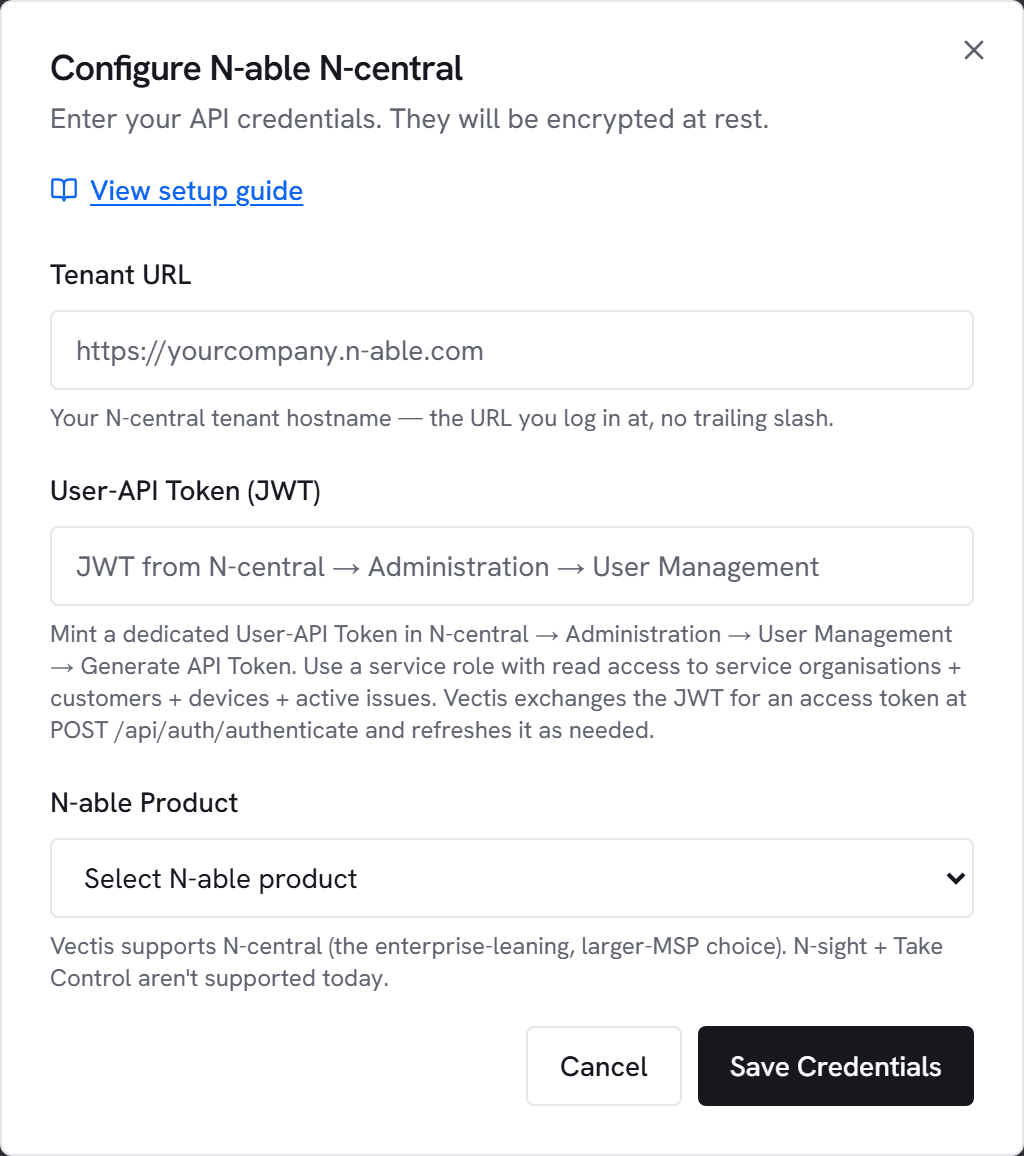
- Go to Admin → Integrations and click Configure on N-able N-central.
- Paste the Tenant URL and User-API Token (JWT), and select your N-able Product (
ncentral). - Click Test. Vectis will exchange the JWT for an access token and call
GET /api/service-orgs; you should see “Connected to N-able N-central” with a visible service-organisation count. - Click Save, then Sync now.
4. Match customers to your PSA customers
After the first sync, Vectis shows a list of N-central customers and tries to fuzzy-match each to one of your ConnectWise / Autotask / HaloPSA customers by name. Anything it can’t auto-match appears as unlinked — drop down and pick the right customer, or mark “Keep separate” for non-MSP-customer records (internal, demo, etc.).
Matching is required for the account hub to show N-central devices and active issues next to PSA tickets for the same customer. Until an N-central customer is linked to a PSA customer, its devices appear only in the RMM section.
5. What the sync populates
Each N-central sync writes the same tables NinjaOne + Kaseya write, so downstream features work without configuration:
- Customer hub — N-central customers, devices, and active issues per customer
- Asset lifecycle — warranty / OS EOL checks run against device serials reported by N-central
- Rules engine triggers — N-central active issues become rule trigger events; templates can open tickets in your PSA based on issue severity, service type, etc.
create_*_ticket / create_ticket actions to drive PSA-side workflows from N-central triggers instead. EDR / firewall / disk-encryption / patch-state posture signals also aren’t populated — those live behind a per-device detail endpoint that Vectis defers for cost reasons; posture compute records the signals as “unknown” rather than “confirmed absent”.Common errors
401 Unauthorized — The User-API Token (JWT) is wrong, expired, or has been revoked. Re-mint in N-central → Administration → User Management and update here.
403 Forbidden — The JWT’s service role lacks read permissions on service organisations, customers, devices, or active issues. Edit the role to grant read access.
404 Not Found — Tenant URL is wrong, or the API endpoint isn’t exposed on this N-central version. Vectis targets N-central’s 2023+ REST API surface; legacy SOAP-only deployments aren’t covered.
429 Too Many Requests — N-central rate-limited you. The Python ETL paces sequential requests well below the documented per-endpoint concurrency limits, but a manual sync triggered alongside the scheduled cron can briefly trip it; wait a minute and retry.
Connection timed out — Check firewall/VPN. N-central’s API hostnames need to be reachable from wherever Vectis is running.