Before you start
You’ll move faster if you have these ready in another tab. None of them are blockers — you can come back — but collecting them now means the next 30 minutes are uninterrupted.
- Admin access to your PSA or RMM. You’ll need to mint an API user or OAuth client, which usually requires a System Admin / Owner role in the source tool.
- The Vectis workspace slug you picked at signup. It’s the subdomain you log into — e.g.
acme.mspvectis.com. Vendors often need it for OAuth redirect URIs. - A second tool you’d like to connect after the first. The product’s value compounds the moment a second source is wired in — a PSA on its own is just a PSA mirror. Decide now and you won’t stop after the first sync.
- 15–30 minutes of uninterrupted time. Each sync is fast, but the back-and-forth between vendor portals and Vectis is the real time cost.
1. Pick your first integration
Vectis correlates customer data across every connector you wire in. Start with whichever of your tools holds your customer list — usually your PSA, but sometimes your RMM if that’s where your accounts live. The first connector becomes the spine; every subsequent tool matches its accounts back to this one.
- Have a PSA? Start with ConnectWise Manage, Autotask, or HaloPSA. Your PSA’s company list defines the customer spine everything else maps to.
- RMM-first shop? NinjaOne or Atera both expose a clean organization list and ship today.
- SaaS-only / co-managed? If you don’t run a traditional PSA or RMM, start with Microsoft 365 for tenant + license data, then layer QuickBooks or Xero for the customer roster.
Pick one and open its per-vendor setup guide in a new tab — each one lists the exact credentials to mint and the screen path inside the vendor portal.
2. Mint credentials and connect
The per-vendor guide handles the vendor side. The Vectis side is identical for every connector and takes about a minute:
- Open Admin → Integrations → the Integrations tab.
- Click Configure on the connector you’re wiring up. The drawer shows exactly which fields it expects.
- Paste each credential from the vendor portal. Most fields have a help tooltip with the exact label the vendor uses (e.g. a ConnectWise private key vs. its client ID).
- Click Test. A green badge means Vectis reached the vendor and the credentials authenticated. A red one shows the specific error and a link to the matching troubleshooting section in the per-vendor guide.
- Click Save. The connector is now enabled and queued for its first sync.
3. Run your first sync and open the customer hub
As soon as you saved, the connector ran an initial sync in the background. The first run pulls your customer list, devices, tickets / alerts, and any contracts the vendor exposes. Most tenants finish in 2–5 minutes; very large PSAs can take 10 for the first full backfill.
You can close the tab — syncs are server-side. To watch progress, the Integrations tab shows the last-sync timestamp updating in real time, and the home dashboard surfaces a progress card while the first sync is in flight.
When the sync finishes, head to Customers and pick any row. This page is the product’s center of gravity — tickets, devices, alerts, backups, contracts, invoices, notes, and a unified timeline, all on one scrollable surface. Every tab below is populated by whichever connector you just wired in. Connect more tools and more tabs light up.
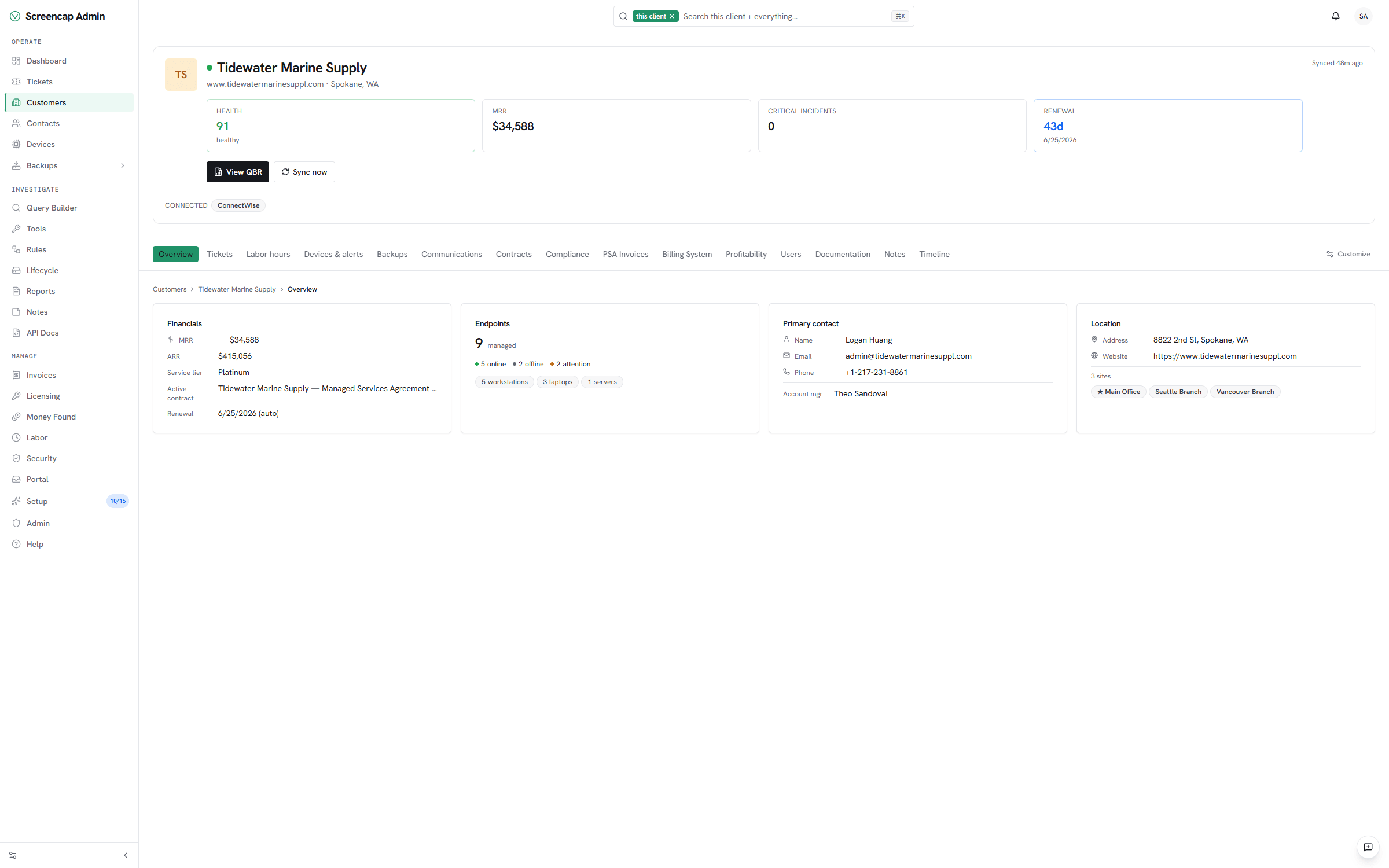
4. Connect a second tool — this is where it gets real
One connector mirrors one tool. Two connectors correlate — and correlation is the entire reason Vectis exists. As soon as a second tool is wired in:
- The customer hub merges its data into the right account automatically — PSA companies, RMM organizations, and Microsoft 365 tenants all match on the customer spine.
- The unified timeline starts mixing ticket activity with backup runs, RMM alerts, and sign-ins on one chronological feed.
- Cross-tool rules (next step) become possible: e.g. RMM critical alert → create a PSA ticket if one doesn’t already exist.
Repeat Pick a connector → mint credentials → Test → Save for the second tool you decided on at the start. If any accounts don’t match, the Customer mapping screen surfaces unmatched rows with a one-click merge.
5. Turn on your first rule
The rules engine is what turns Vectis from a read-only view into a workspace that actually does things across your stack. A dozen opinionated templates ship out of the box; the most popular first rule is the one shown below — turn an unacked RMM critical into a PSA ticket so nothing falls between tools.
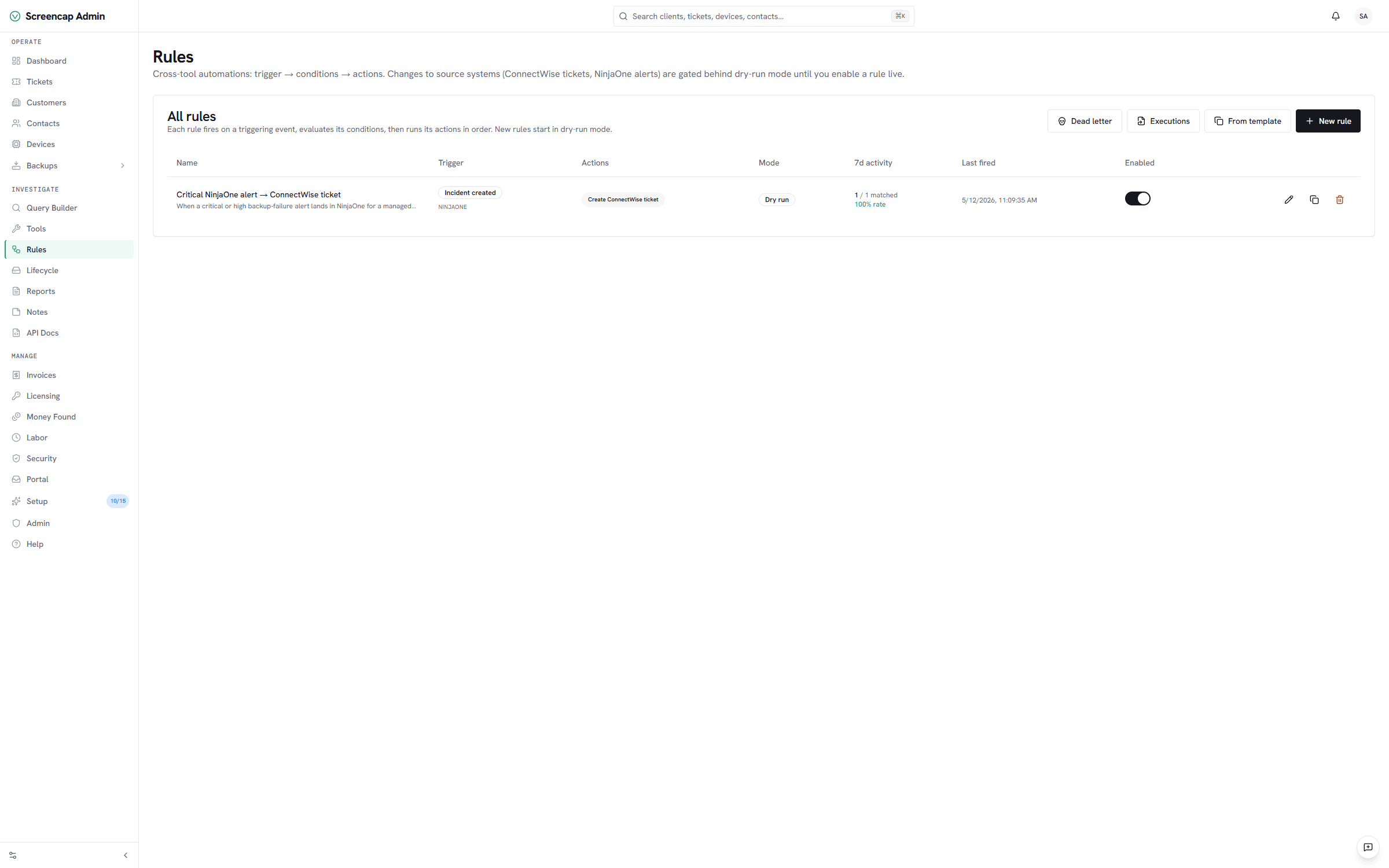
- Open Rules and click From template. Pick one that matches tools you’ve already connected.
- Leave it in Dry-run mode for the first 24 hours. Vectis evaluates every trigger and records what the rule would have done, without writing to any source system.
- After a day, open the rule’s Activity tab. If the dry-run targets look right, flip it to Live and the rule starts writing back to the source tool.
6. Turn on Money Found
Once your billing or licensing tools are connected, the weekly Money Found digest correlates contracts, license counts, and invoiced lines to find revenue leakage you’re paying for but not billing for. It runs on Monday mornings and drops a single email per workspace into the admins’ inbox.
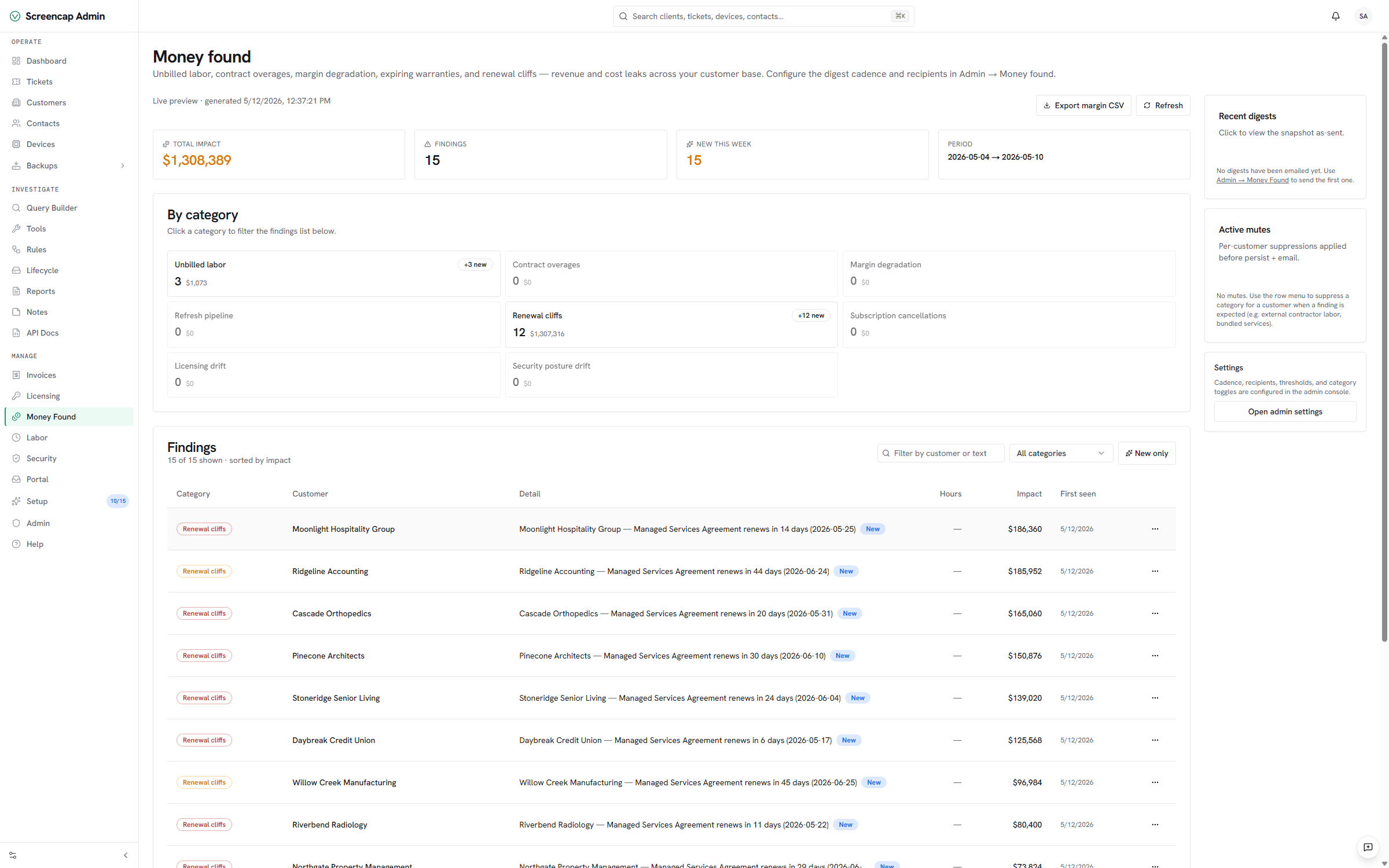
Open Money Found and pick which sources to include. Microsoft 365 license drift is the most common first hit — uncontracted seats on customer tenants you’re not invoicing for. Enable it, save, and you’ll get your first digest the following Monday.
7. Invite your team
From Admin → Users, add the dispatchers, techs, and account owners who’ll live in Vectis day to day. Three roles, all enforced server-side:
- Admin — full surface, including integration credentials, billing, and rule editing.
- Member — every operational action (tickets, alerts, rules toggle), no credentials, no billing.
- Viewer — read-only across the workspace.
If your org uses SSO, the SSO setup guides (Okta, Entra, Google Workspace, JumpCloud) walk through enforcing it before you invite anyone — cleaner than rolling people off password auth later.
You're set up when…
Use this as the explicit checkpoint that Vectis is doing its job. If any of these aren’t true yet, the matching step above is where to revisit.
- At least two connectors are green on the Integrations tab, last-synced within the past hour.
- Your customers list matches the customer count in your PSA / RMM — off by at most a handful of merged duplicates flagged on the mapping screen.
- One rule is live (or at least passing dry-run with the targets you expected).
- Money Found is enabled and the next Monday digest is queued.
- The right people are invited with the right roles — or SSO is enforced if that’s your model.
From here, the natural next reads are the customer hub, rules engine, and audit log guides — the three surfaces you’ll spend the most time in.