One screen per customer. Everything you’d open five tools for.
One · Customer hub
Every customer, top to bottom, on one page.
The hub is built around the customer account, not the data source. Tickets, alerts, devices, backups, contracts, invoices, and an internal notes surface render as tabs on one page, each populated from whichever connectors that customer happens to be wired to. The M365 integration tab surfaces Intune compliance, Secure Score with a 30-day sparkline, Conditional Access policy coverage, and privileged-account MFA posture — not a one-liner, but a real per-customer security review in four panels. Pax8 seat adjustments and quote creation are inline actions in the licensing tab. Every write-back carries the operator, the target, and the full payload into the append-only audit log.
Used withConnectWiseAutotaskHaloPSANinjaOneMicrosoft 365Pax8
Two · Cross-tool rules
If this in tool A, then that in tool B — with the audit trail.
payload{ "event": "disk.critical" "device": "acme-fs01" "pct_used": 96.4, "customer": "acme"}
payload{ "event": "disk.critical" "device": "acme-fs01" "pct_used": 96.4, "customer": "acme"}
Triggers come from any connected system — RMM alerts from NinjaOne, PSA events from ConnectWise, backup outcomes from Datto, endpoint detections from SentinelOne or Huntress, vendor webhooks. Conditions span the unified data with AND/OR grouping and cross-system checks (e.g. “a detection fired with no matching ticket and no existing suppression”). Actions write back to the right system: create or update a ticket, isolate an endpoint, resolve a detection, mark a false positive, acknowledge an alert, notify the customer portal, adjust Pax8 seats. Every new rule ships with a mandatory dry-run mode and per-integration rate limits.
Three · Timeline
What happened, in order, across every tool.
- 08:12Patch cycle completedNinjaOne47 of 47 devices · 0 failures
- 08:34Ticket #4821 reply receivedConnectWisefrom sarah@acme · response · 18m
- 09:02Nightly backup verifiedDattoDC01 · 412 GB · last-known-good
- 09:18Disk warning · workstation-12NinjaOne82% · trending +2% / 24h
- 09:47Ticket #4828 openedConnectWiseOutlook crash · P3 · Service Desk
- 10:04Invoice #INV-2104 paidQuickBooks$4,200 · ACH · cleared
- 10:31Ticket #4828 reply sentConnectWisefrom tech-a · resolution attempted
- 11:09Antivirus signature updatedNinjaOneESET · 47/47 endpoints current
- 11:42Mid-day snapshotDattoVM acme-sql01 · 22 GB delta
- 13:15Ticket #4828 closedConnectWiseresolved · KB-1042 referenced
- 14:08Contract renewal flaggedQuickBooksterm ends in 27 days · auto-renew on
- 16:50After-hours patch window openedNinjaOne12 devices in queue · server group
The timeline is the per-customer event feed, merged across every connected system into one chronological stream with source tags on every entry. Date filters scrub by day, week, or arbitrary range; source filters narrow to one tool when you need to. Internal Vectis-native notes interleave with vendor events, so the “we talked to their CIO at 4pm” line lives on the same surface as the ticket and the alert — not in a separate notes app no one opens.
Four · Query builder
Ask anything across the unified data.
- idjoin
- name
- tier
- mrr
- customer_idjoin
- ran_at
- status
- size_gb
- customer_idjoin
- renews_on
- term
- value
| customer | last backup fail | renews in | contract value |
|---|---|---|---|
| Aldridge & Co. | 2d ago | 12 days | $3,200/mo |
| Bayside Bistro | 5d ago | 21 days | $1,400/mo |
| Coast Logistics | 1d ago | 9 days | $5,900/mo |
| Drexel Dental | 6d ago | 28 days | $4,320/mo |
| Edison Manufacturing | 3d ago | 17 days | $8,750/mo |
note · The join builder reads from a frozen schema allowlist — a misclick can’t reach an internal table, and the query plan is tenant-scoped by construction.
The query builder is a point-and-click join interface over a frozen allowlist of schema tables: customers, tickets, conversations, contracts and line items, daily metrics, SLA snapshots, backup connectors, invoices, payments, credit memos. AND/OR filters with operators per column type; one-click Excel export; saved queries shared with your team and audit-logged on every execution.
Five · Endpoint security
Four vendors, one detection surface — with inline response actions.
SentinelOne, ESET, Huntress MDR, and Microsoft Defender for Business each have a connector that syncs their active detections, threats, and incidents into the customer hub. On the hub, every detection card shows vendor, severity, affected device, and detection timestamp. A tech can isolate the endpoint, resolve the incident, or mark it a false positive without leaving the customer page — the action writes back to the source tool through the connector and lands in the audit log. The rules engine can also trigger on detections: a high-severity SentinelOne detection with no matching PSA ticket can auto-create one, route it to the right tech, and set severity before a human sees it.
Six · Customer portal
A surface your customers see, branded as your MSP.
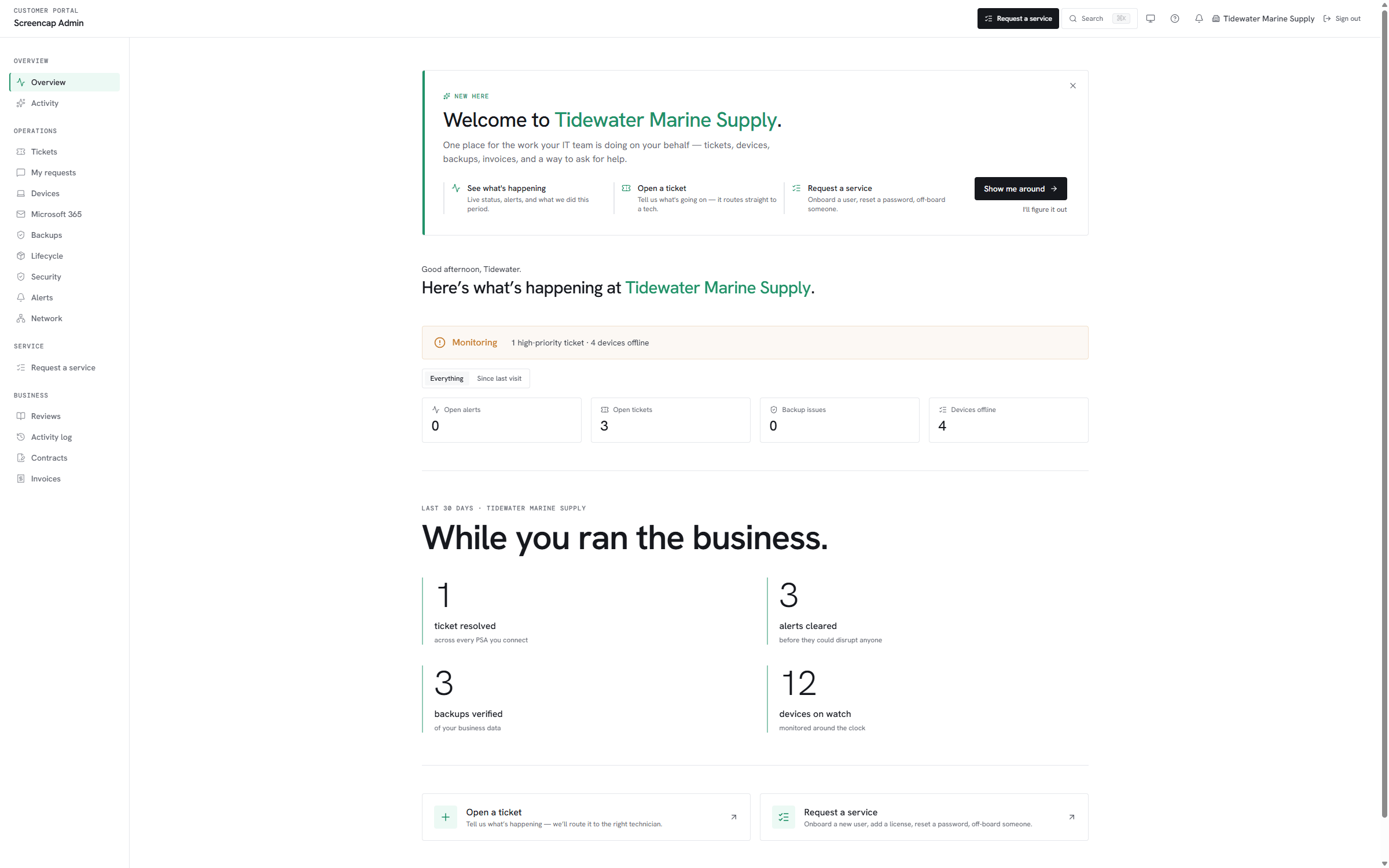
The portal runs under a per-tenant subdomain with your logo and accent color baked into the email shell and the navigation chrome. Ticket submissions land in your PSA on the configured board; multi-site clients see the parent rollup with site-level drill-in; outbound notifications ride the unified email shell with CAN-SPAM scaffolding already wired. Every customer-facing action lands in the audit log alongside every operator action — one trail, two surfaces.
Built to extend
Open protocols, not a walled garden.
Vectis exposes its tenant data over three surfaces a technical buyer expects to find on day one. The public REST API covers the same read and write actions the in-product UI calls, scoped by personal access token. An open Model Context Protocol endpoint lets any MCP-compliant client — Claude Desktop, Cursor, ChatGPT, your own — read and act against your tenant; Vectis itself never calls a model, the protocol is the product. Inbound webhook receivers accept signed payloads from any vendor that emits them, so Pax8 license deltas and ConnectWise ticket updates hit Vectis the moment they happen rather than on the next sync cycle.
REST / MCP / Webhooks — on every tier.
Compare
Evaluating another tool alongside Vectis?
Honest side-by-sides on the products MSPs most often shortlist next to Vectis.