What Vectis does with IT Glue
- Syncs organization metadata so every IT Glue organization becomes a customer row in Vectis.
- Mirrors documents, configurations, and flexible assets onto the customer hub’s Documentation section — deep-linked to IT Glue for full rendering.
- Password metadata only — name, category, username, last-updated timestamp, and who-can-access. Vectis never calls the
show_password=truequery or the/passwords/:idsingular endpoint. The secret stays in IT Glue; Vectis links you there when a tech needs it.
What you'll need
- API Key — minted in IT Glue’s Account → Settings → API Keys panel.
- Region — one of US (
api.itglue.com), EU (api.eu.itglue.com), or AU (api.au.itglue.com). Match the datacenter your IT Glue tenant lives in; Vectis never auto-probes unlisted endpoints.
1. Mint an API key in IT Glue
- In IT Glue, open Account → Settings → API Keys.
- Click Generate new API key. Name it “Vectis”. Assign a key type or role that canView Organizations, Documents, Configurations, Flexible Assets, and Password metadata.
- Copy the key that IT Glue displays. It’s shown only once.
The API key inherits the role you assign it. If you see unexpected entries in IT Glue’s audit log, rotate the key from the same screen and update it here.
2. Paste credentials into Vectis
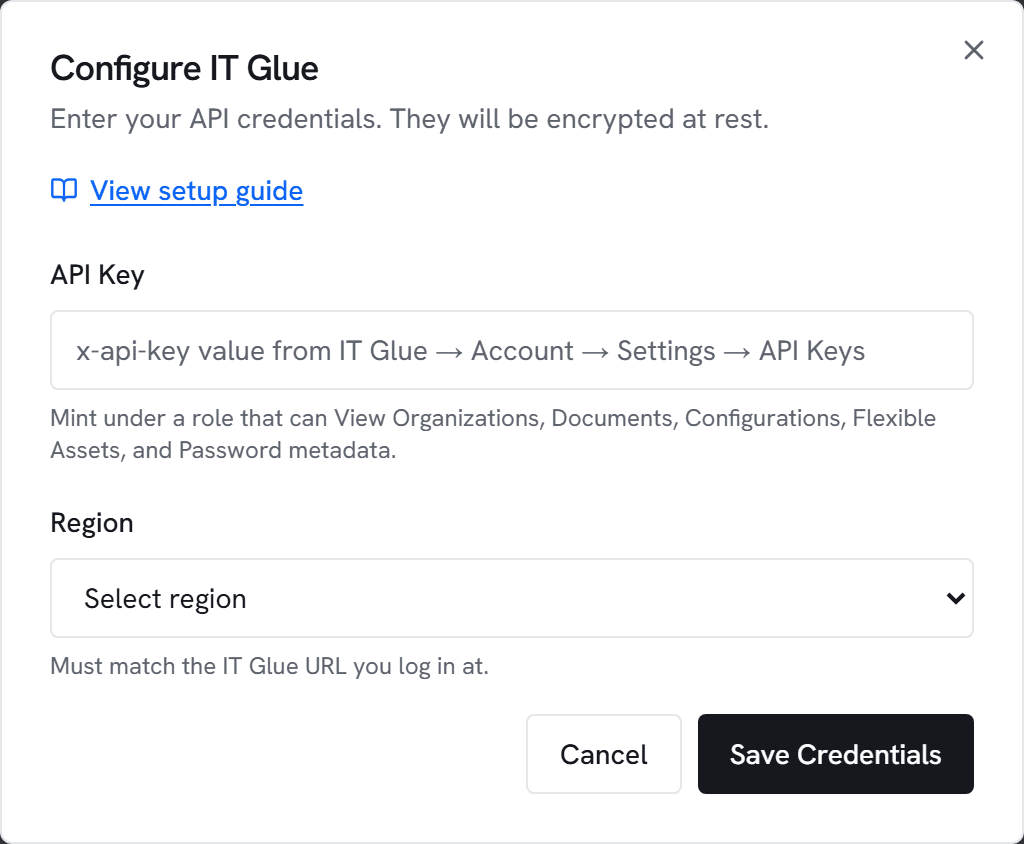
- Go to Admin → Integrations and click Configure on IT Glue.
- Paste the API key and pick the region matching your IT Glue URL (US / EU / AU).
- Click Test. You should see “Connected to
api.itglue.com” (or the regional host) with the count of organizations visible to your key. - Click Save, then trigger an initial sync.
3. What appears where
- Customer hub → Documentation section: grouped lists of documents, configurations, and flexible assets for the open customer — alongside any Hudu entries if you also run Hudu.
- Password metadata: password rows appear with name + category + username visible. Clicking through opens the record in IT Glue for the actual secret.
- Inline preview: click a document row to fetch its body on-demand. Vectis never caches the body — every view round-trips to IT Glue and lands an entry in the audit log.
Common errors
401 Unauthorized — The API key is invalid or has been revoked. Mint a new key and update it here.
403 Forbidden — The key’s role lacks read access on one of the resources we sync (Organizations, Documents, Configurations, Flexible Assets, Passwords). Grant the missing scope in IT Glue and click Test again.
404 — The region is likely wrong. US tenants hit api.itglue.com; EU tenants hit api.eu.itglue.com; AU tenants hit api.au.itglue.com. Reconfigure the connection with the matching region.
429 Rate limited — IT Glue caps API usage at 10 req/sec per key; Vectis paces at 5. If you still see 429s, another integration or script is sharing this key. Mint a dedicated Vectis key and retry.