Private beta
Sherweb support is doc-validated against developers.sherweb.com but awaiting first-customer onboarding to confirm a real Service Provider tenant syncs cleanly. Email support to opt in.
Email support@mspvectis.com to request access. The setup steps below describe the intended self-serve flow once the connector exits beta.
What Vectis does with Sherweb
- Syncs customers and subscriptions from your Sherweb Service Provider tenant into
customersandlicense_subscriptions. Customers are fuzzy-matched to PSA rows so license data hangs off the canonical customer hub. - Weekly usage snapshots land in
license_usageso seat-count drift is detected on week-scale cadence — the same Money Found signal Pax8 produces. - Coexists with Pax8. Subscriptions are vendor-tagged (
vendor='sherweb'or'pax8'), so leakage + margin + drift detection work identically whether your MSP uses one distributor or both. - Read-only. Vectis never writes back to Sherweb — subscription changes always go through the Sherweb portal or your billing flow, not Vectis.
What you’ll need
- Client ID and Client Secret from the Sherweb Partner Portal’s API Credentials page
- Subscription Key — the APIM subscription key that pairs with the OAuth client (shown alongside the client ID in the Partner Portal)
1. Mint API credentials
- Sign in to the Sherweb Partner Portal as an admin.
- Open Settings → API Credentials.
- Click Create new credential. Label it “Vectis”. Select the service-provider scope (read-only access to customers, billing subscriptions, and the catalog — the only scope Vectis uses).
- Copy the client ID, client secret, and subscription key Sherweb displays. The secret is shown only once; if you lose it, revoke and regenerate.
2. Paste credentials into Vectis
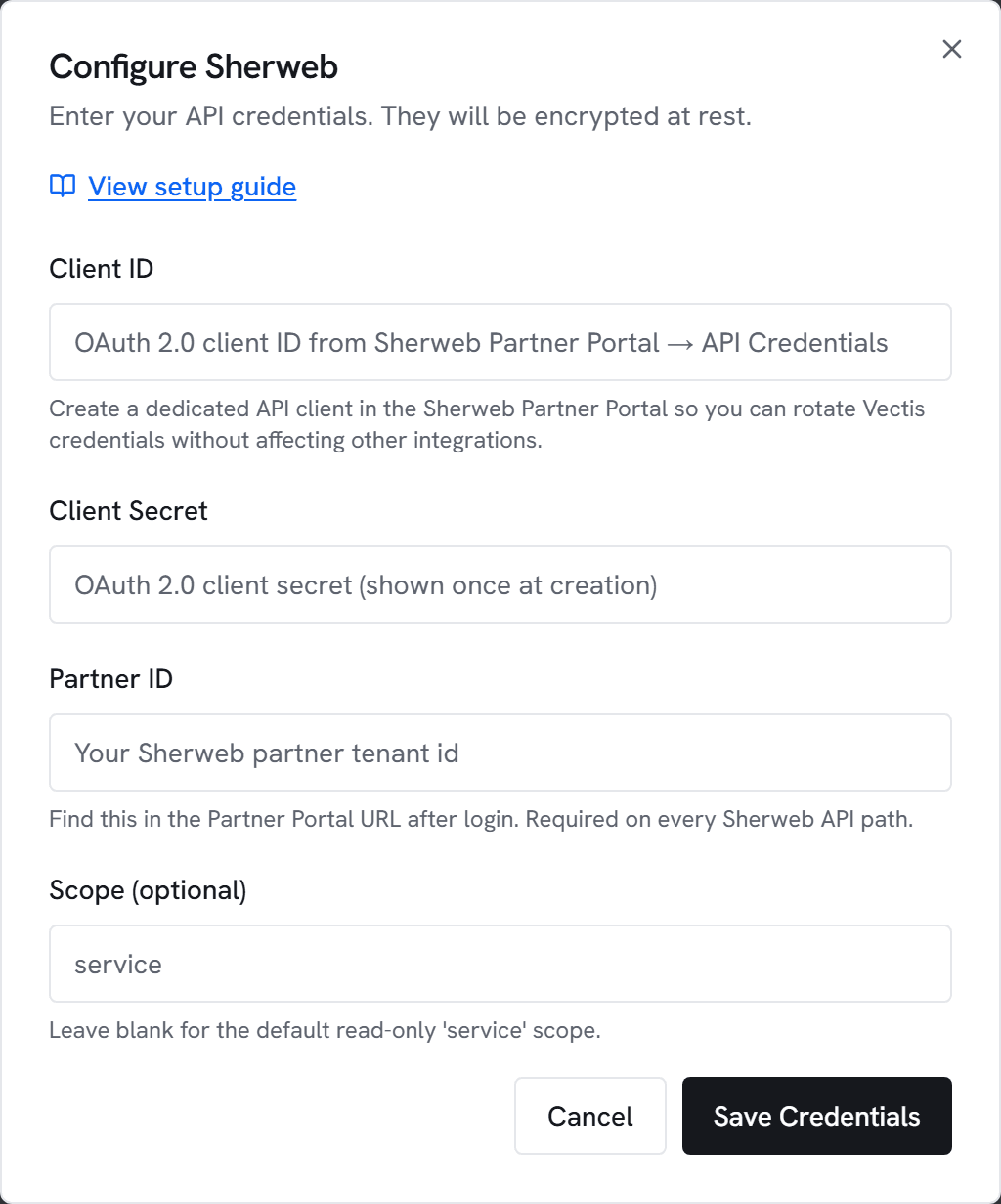
- Go to Admin → Integrations and click Configure on Sherweb.
- Paste the client ID, client secret, and subscription key. Leave scope blank unless Sherweb gave you a non-default scope.
- Click Test. You’ll see “Connected to Sherweb — N customers visible” within a few seconds.
- Click Save, then trigger an initial sync.
3. What appears where
- Customer hub → Licensing section: per-SKU rollups, cost vs. revenue margins, uncontracted-seat counts. Sherweb and Pax8 subscriptions render identically in the same table — the vendor column disambiguates.
- Licensing-leakage dashboard preset: every customer with uncontracted Sherweb seats or below-margin SKUs surfaces here.
- Weekly Money Found digest: seat-growth findings + licensing drift events surface in the Monday email.
- QBR report: Licensing section vendor label is “Sherweb”, “Pax8”, or “Mixed” depending on which distributor(s) the customer uses.
Common errors
401 Unauthorized — Client ID / secret pair is wrong, or the client was revoked. Rotate from the Partner Portal and re-enter.
403 Forbidden — The client is missing the service-provider scope, or the subscription key doesn’t pair with the OAuth client. Recreate the credential and ensure the read-only service-provider scope is selected.
404 on /service-provider/v1/customers — Base URL override is wrong. Remove any custom base URL and let Vectis default to api.sherweb.com.
429 Too Many Requests — Sherweb rate limits at ~60 req/min per APIM subscription key. The ETL paces below that; if you see 429s, another tool is likely sharing the credential — mint a dedicated one for Vectis.