Skip to content
All integrations

Network integration

Aruba Central (HPE) logo

Vectis + Aruba Central (HPE).

HPE Aruba Networking Central sites and devices on every customer's account hub. OAuth with auto-refresh keeps the connection alive without operator babysitting.

Read-onlyVectis syncs from this tool. Inline write-back is not supported by the vendor's documented API surface.
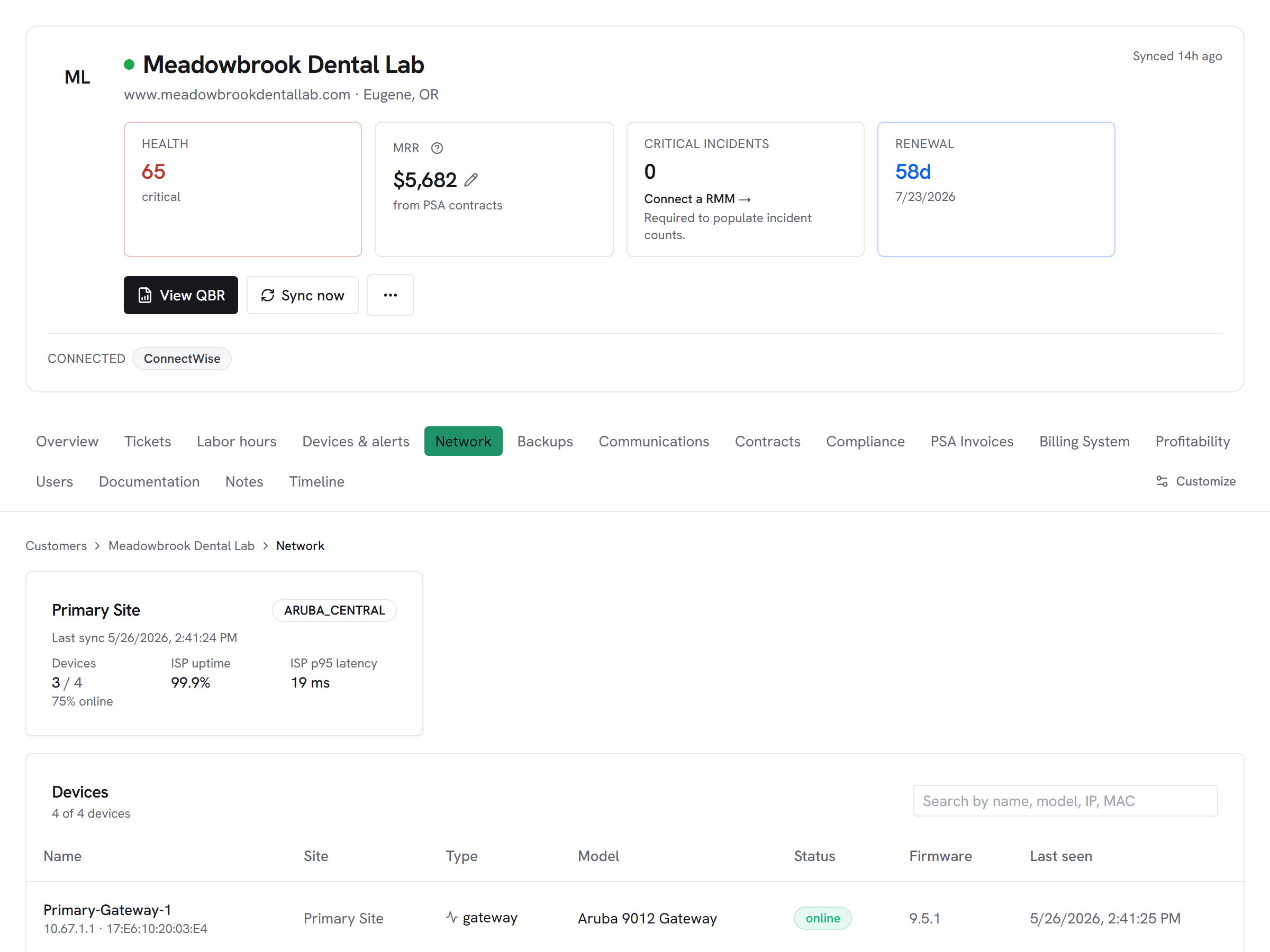
Vectis customer hub network tab for an Aruba Central-connected customer — per-site device count, ISP uptime, latency, devices-online ratio, and device-level inventory with status.

What Vectis syncs

The read side of the adapter.

Vectis enumerates every site discovered from the regional API Gateway under your Aruba Central OAuth app, then pulls per-site devices — gateways, switches, access points — with their model, serial, status, and firmware. Site-to-customer mappings, configured once in the admin screen, drive everything that reaches the customer hub or portal: only mapped sites surface, unmapped ones stay hidden.

What you can do

The write side of the adapter.

Aruba Central is a read-only adapter here — Vectis surfaces site and device state and feeds it into rules, but configuration changes stay inside Aruba Central. The cross-vendor pattern is what matters: Aruba devices land in the same network_devices table as UniFi and Meraki, source-tagged by vendor, so a rule that fires on 'any access point offline > 30 minutes' works across every Network adapter without per-vendor branching.

Honest about the limits

What we don’t do, and why.

The Aruba Central API surface is read-only in Vectis by deliberate scope — configuration changes happen inside the Central console. The OAuth flow uses a 2-hour access token plus a long-lived refresh token; Vectis auto-refreshes the access token without operator action unless the OAuth app itself is rotated. Regional gateway URLs matter: HPE runs Central instances in multiple regions, and the OAuth app is scoped to one — pick the gateway URL that matches the region your tenant lives in.

How it correlates

One customer, every tool.

Aruba Central (HPE) on the customer account hub alongside every other system you run — not a standalone dashboard. A few of the most common shapes this takes:

Network device drift next to the PSA ticket history

An Aruba site that suddenly reports stale device check-ins lands in the same timeline as the customer's ticket activity, so the operator sees the network event and the user-reported impact in one place.


Vendor-agnostic network rules

Aruba devices land in the same network_devices table as UniFi and Meraki, source-tagged by vendor. A rule that fires on "any access point offline > 30 minutes" works across every Network adapter without per-vendor branching.

Setup snapshot

What connecting looks like.

In Aruba Central, open API Gateway → System Apps & Tokens and mint an OAuth app dedicated to Vectis. Capture all four values: client id, client secret, the current access token, and the refresh token. Paste them plus your regional gateway URL into Vectis admin → Integrations → Aruba Central. The first sync auto-discovers every site the OAuth app can see; map each site to a Vectis customer in the same admin screen. Only mapped sites surface to customer pages. Vectis refreshes the 2-hour access token automatically via the refresh token — no operator action needed unless the OAuth app itself is rotated.

# In the Vectis hub, add the connector:
category  Network
vendor    Aruba Central (HPE)
status    Read-only

Read the full setup guide

Other Network integrations

Evaluating Aruba Central (HPE) against the alternatives?

Pricing

Aruba Central (HPE) is available on every Vectis tier — $299/mo and up. See pricing

Also reachable over MCP — bring your own client → /mcp

Try Vectis with Aruba Central (HPE).

30-day free trial. Connect Aruba Central (HPE) at signup. See every customer with their full context on day one. Month-to-month, cancel anytime.
Vectis + Aruba Central (HPE) Integration | Unified Workspace for MSPs | Vectis