
Skip to content
All integrations

Documentation integration

Egnyte logo

Vectis + Egnyte.

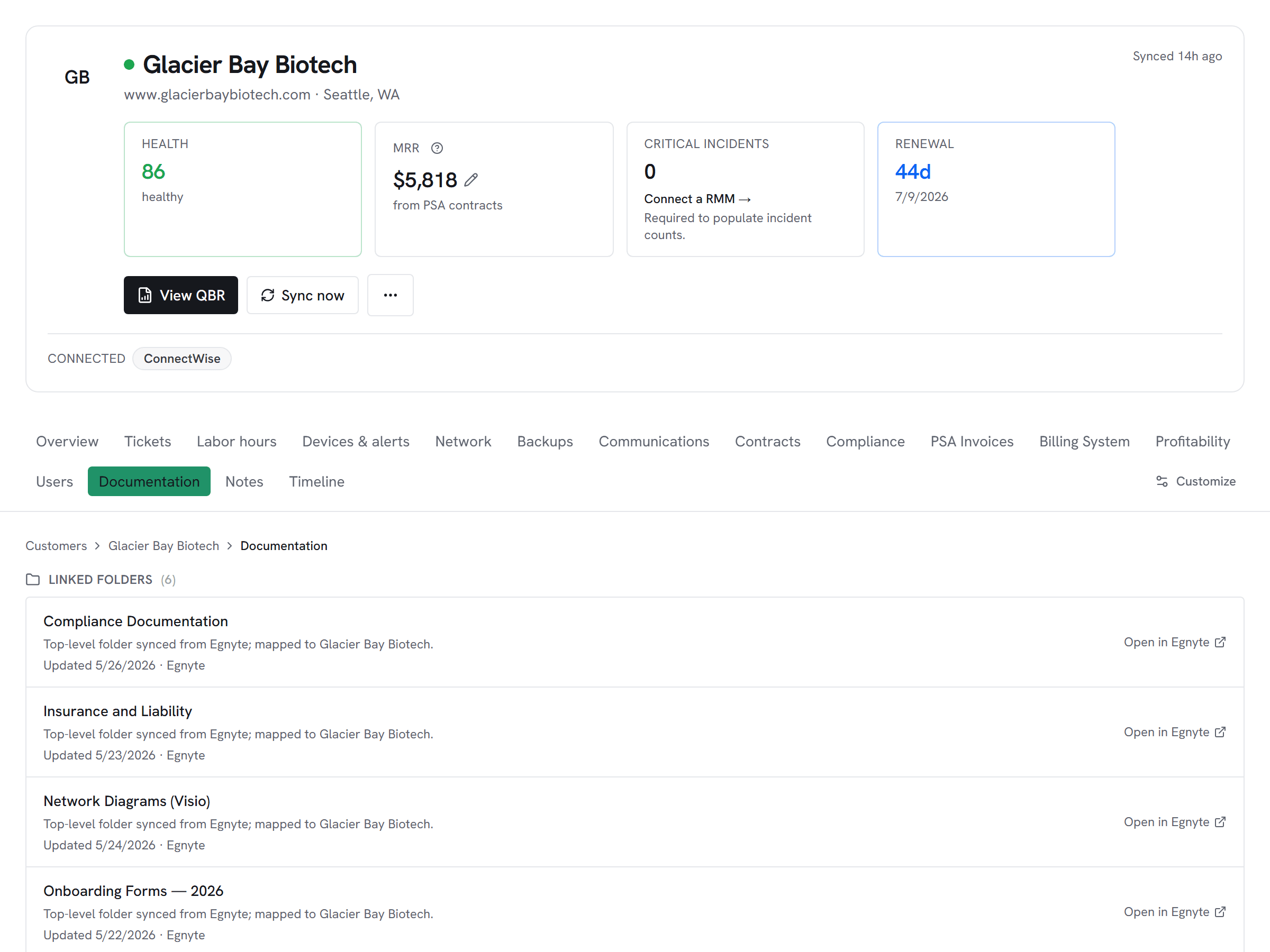
Each customer's Egnyte folder on the same page as their tickets and alerts — recent files live from the Egnyte API, no file content cached.

Read-onlyVectis syncs from this tool. Inline write-back is not supported by the vendor's documented API surface.
Vectis customer hub documentation tab showing Egnyte-mapped top-level folders for a customer — Compliance Documentation, Vendor Contracts, Network Diagrams, with one-click open-in-Egnyte per folder.

What Vectis syncs

The read side of the adapter.

Vectis stores one pointer per customer-mapped folder under your configured clients root — folder name and Egnyte deep-link, so 'Open in Egnyte' is one click. The folder's last-modified timestamp syncs so the customer hub shows freshness without holding a list of files in Vectis. Recent file metadata is fetched live from Egnyte on demand; nothing is cached server-side.

What you can do

The write side of the adapter.

Egnyte is a read-only adapter here — Vectis surfaces the right docs surface per customer without ever caching file contents. If your team uses Egnyte (or moved off IT Glue/Hudu to a cloud file server), the customer hub still shows the docs in the right place. Clicking the customer's folder card fetches the most recently modified files live, with every read audit-logged inside Vectis.

Honest about the limits

What we don’t do, and why.

File contents are never persisted in Vectis — only folder pointers and on-demand metadata requests. The OAuth token uses Egnyte's password-grant flow, which the vendor still supports for service-account-style integrations; if your Egnyte tenant has disabled password grant, you'll need to mint a token through the alternate authorization-code flow and paste the resulting long-lived token into Vectis manually. Folder mapping is name-normalized against your clients root, with a pin override available when the folder name doesn't match the PSA name (acquisitions, abbreviations).

How it correlates

One customer, every tool.

Egnyte on the customer account hub alongside every other system you run — not a standalone dashboard. A few of the most common shapes this takes:

File-server MSPs aren't second-class citizens

If your team uses Egnyte (or moved off IT Glue/Hudu to a cloud file server), the customer hub still shows you the right docs surface. Click the customer's folder card to fetch the most recently modified files live — never cached, always fresh.


Folder mapping that survives renames

Vectis matches each subfolder under your configured clients root to a customer by normalized name. When the folder name doesn't match the PSA name (acquisitions, abbreviations), pin the customer to a specific folder path and the auto-match yields to the override.

Setup snapshot

What connecting looks like.

In the Egnyte Developer portal (developers.egnyte.com), register an API key and run the password-grant flow once to mint a long-lived access token. Paste the access token plus your Egnyte subdomain (the `<x>` in `<x>.egnyte.com`) and the absolute path to your clients root folder (for example, /Shared/Work/Acme/Clients) into Vectis. The adapter tests by calling /pubapi/v1/userinfo and listing the configured root before saving so a wrong path fails fast. File contents are never persisted on Vectis side — the customer hub fetches recent file metadata live on demand and audit-logs every read.

# In the Vectis hub, add the connector:
category  Documentation
vendor    Egnyte
status    Read-only

Read the full setup guide

Other Documentation integrations

Evaluating Egnyte against the alternatives?

Pricing

Egnyte is available on every Vectis tier — $299/mo and up. See pricing

Also reachable over MCP — bring your own client → /mcp

Try Vectis with Egnyte.

30-day free trial. Connect Egnyte at signup. See every customer with their full context on day one. Month-to-month, cancel anytime.
Vectis + Egnyte Integration | Unified Workspace for MSPs | Vectis