
Skip to content
All integrations

Documentation integration

Hudu logo

Vectis + Hudu.

Documentation from Hudu on the same page as tickets, alerts, and backups — without syncing passwords.

Read-onlyVectis syncs from this tool. Inline write-back is not supported by the vendor's documented API surface.
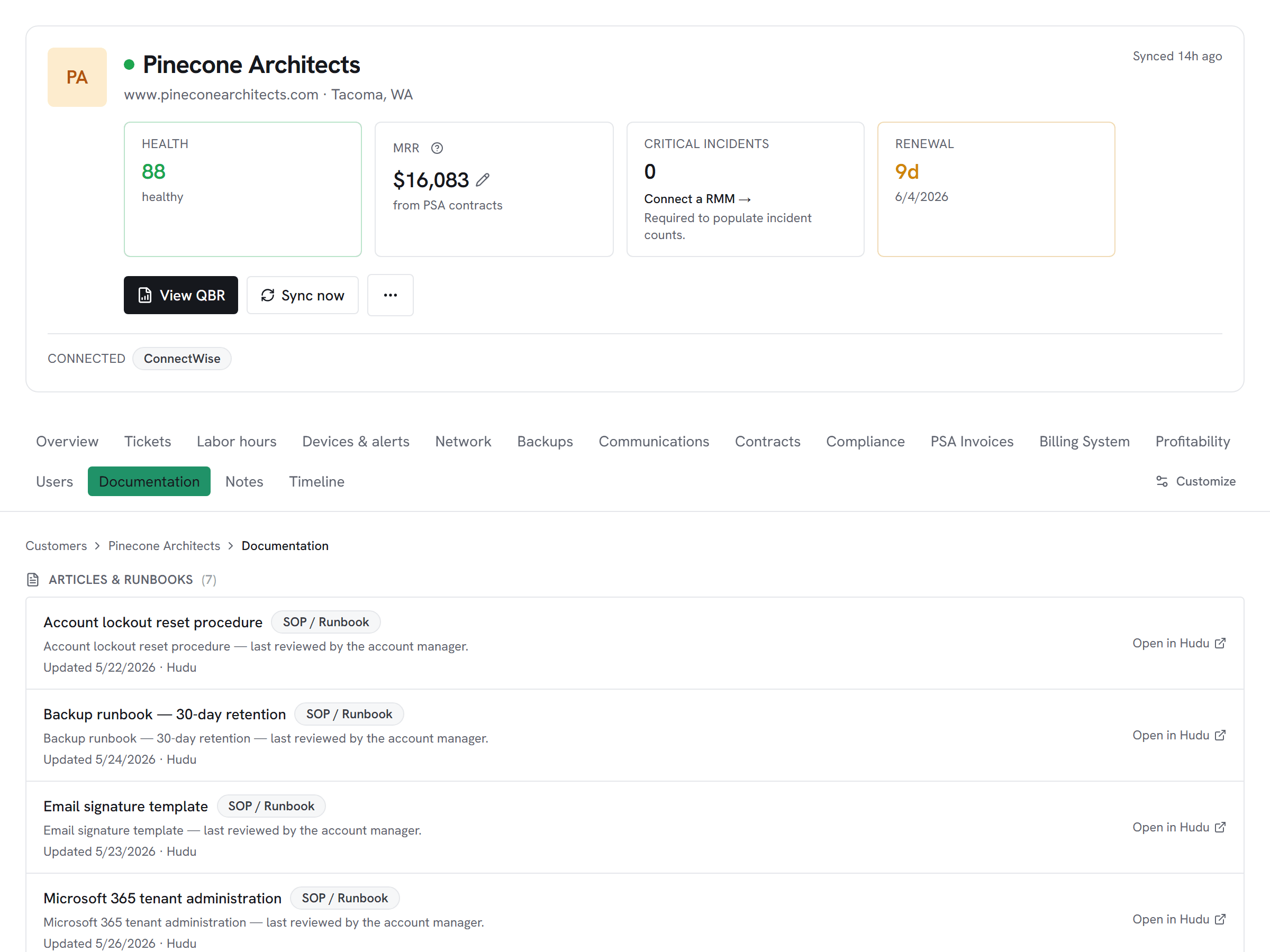
Vectis customer hub documentation tab showing Hudu-synced articles for a customer — Microsoft 365 tenant admin, Wi-Fi credentials, backup runbook, each with last-reviewed timestamps and click-through to Hudu.

What Vectis syncs

The read side of the adapter.

Hudu companies map onto Vectis customer accounts on first sync, and from there Vectis pulls articles with titles, bodies, and tags so the documentation surface is searchable from the customer hub. Assets sync with their fields, grouped by asset type, so a tech can verify a laptop's serial or warranty without context-switching to Hudu. Hudu remains the source of truth for passwords; the UI links out for the secret reveal.

What you can do

The write side of the adapter.

Hudu is a read-only adapter here — articles and asset records render in-page on the customer hub so a dispatcher doesn't have to swap to Hudu in another tab while a customer waits. Every Hudu asset joins the same hub as the RMM devices for that customer, which is what lets a tech verify a laptop's serial, warranty, and documented owner in one view instead of triangulating across three tools.

Honest about the limits

What we don’t do, and why.

Passwords are never synced into Vectis — the UI links out to Hudu when a tech needs to access a secret, with the audit-log entry recorded on the Hudu side rather than duplicated in Vectis. The Hudu API key inherits the permissions of the service user that owns it, so scope the user's access to what Vectis should actually see; the adapter does not call any write endpoints, but a too-broad read key would surface assets you'd rather Vectis didn't see.

How it correlates

One customer, every tool.

Hudu on the customer account hub alongside every other system you run — not a standalone dashboard. A few of the most common shapes this takes:

Runbook link, right next to the ticket

A dispatcher opens a customer and sees Hudu articles and asset records in-page — no 'one sec, let me open Hudu in another tab' while the customer waits. Hudu remains the source of truth; Vectis links back for passwords.


Docs that stay with the customer

Every Hudu asset joins the customer hub next to the RMM devices for that same customer. Verify a laptop's serial, warranty, and documented owner in one view.

Setup snapshot

What connecting looks like.

In Hudu, open Admin → API Keys and create a dedicated key for Vectis under a service user whose permissions match what you want Vectis to surface. Paste your Hudu tenant URL and the API key into Vectis; the adapter tests with /api/v1/companies before saving so a bad URL or wrong-scope key fails fast. Passwords are never synced — only metadata — and the UI links out to Hudu when a tech needs access to a secret. The first sync pulls companies, articles, and assets end-to-end; subsequent syncs run incrementally on a schedule.

# In the Vectis hub, add the connector:
category  Documentation
vendor    Hudu
status    Read-only

Read the full setup guide

Other Documentation integrations

Evaluating Hudu against the alternatives?

Pricing

Hudu is available on every Vectis tier — $299/mo and up. See pricing

Also reachable over MCP — bring your own client → /mcp

Try Vectis with Hudu.

30-day free trial. Connect Hudu at signup. See every customer with their full context on day one. Month-to-month, cancel anytime.
Vectis + Hudu Integration | Unified Workspace for MSPs | Vectis