RMM alarms on the same page as PSA + billing
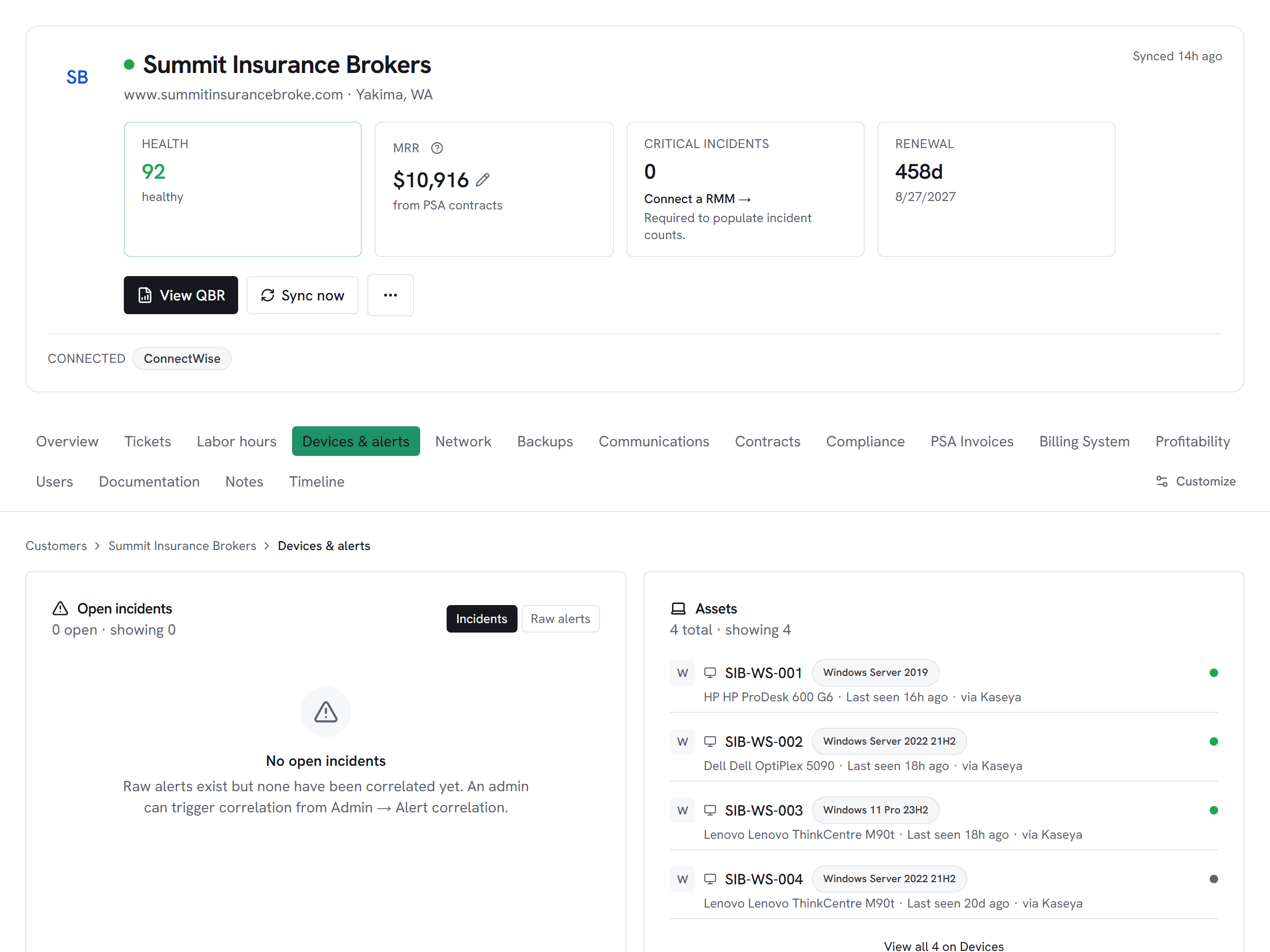
Kaseya alarms for a customer join their ConnectWise or Autotask tickets and their Pax8 license inventory on one page. The account hub is one consistent shape regardless of which RMM you run.
RMM integration

Kaseya-stack MSPs get an RMM-agnostic customer hub — organizations, agents, and alarms surface alongside every other tool you run.
In Beta
Vectis + Kaseya VSA is in Beta. We built this connector against Kaseya VSA’s published API documentation (verified endpoints in scripts/audit/known-endpoints/kaseya.json). It’s fully connectable today — credentials save and syncs run. Because Kaseya VSA doesn’t offer a public sandbox for us to live-test against, the first paying customer who connects it is the de-facto live validator. If you’re considering Vectis with Kaseya VSA and want to be the validator, talk to us.
What Vectis syncs
Every Kaseya organization becomes a Vectis customer account on first sync, and from there Vectis pulls each agent and device with its OS, health, and last check-in. Alarms come in with severity and current state so the customer hub surfaces what's on fire right now — alongside ConnectWise or Autotask tickets for the same customer and any Pax8 / Sherweb license inventory the MSP runs.
What you can do
Kaseya VSA X is a read-only adapter here — Vectis syncs the data above and feeds it into rules, but the vendor's REST API documents no acknowledge or close verb for alarms, so the lifecycle stays inside the Kaseya console. The value is in correlation: a Kaseya alarm can fire a rule that opens a PSA ticket on a ConnectWise or HaloPSA board, mapped to the right customer, without anyone copy-pasting alarm bodies between tools.
Honest about the limits
Read-only adapter. Kaseya VSA X's REST API exposes no documented verb to acknowledge or close an alarm — the only documented mutation on /api/v3/notifications/{id} is DELETE, which destroys the row entirely (different semantic). Vectis surfaces alarms on the customer hub and feeds them into rules, but the ack/close lifecycle stays inside Kaseya. The 2026-05-09 endpoint audit confirmed the prior client called fabricated paths; the current implementation is documented against the verified endpoints in scripts/audit/known-endpoints/kaseya.json.
How it correlates
Kaseya VSA on the customer account hub alongside every other system you run — not a standalone dashboard. A few of the most common shapes this takes:
Kaseya alarms for a customer join their ConnectWise or Autotask tickets and their Pax8 license inventory on one page. The account hub is one consistent shape regardless of which RMM you run.
A single rule template — 'RMM alert older than 30 minutes with no PSA ticket → open one' — works whether the alert came from Kaseya or NinjaOne. Same cross-tool ticket creation, different RMM source.
Setup snapshot
Mint a dedicated API token in Kaseya VSA → Settings → API Access → Tokens. A read-only service role over organizations, agents, and alarms is sufficient — Vectis does not call any alarm-mutation endpoints (Kaseya doesn't expose them anyway). Paste the token and your VSA tenant URL into Vectis and pick your VSA major version: VSA 10 SaaS today, with on-prem VSA 9 and VSA X targeted for follow-up phases. Vectis tests with a paginated org query before saving so a wrong-token configuration fails fast.
# In the Vectis hub, add the connector:
category  RMM
vendor    Kaseya VSA
status Read-onlyOther RMM integrations
Pricing
Kaseya VSA is available on every Vectis tier — $299/mo and up. See pricing
Also reachable over MCP — bring your own client → /mcp