
Skip to content
All integrations

Backup integration

Keepit logo

Vectis + Keepit.

Per-customer Keepit backup health on the same hub as PSA, RMM, and billing — no Keepit tab swap.

Read-onlyVectis syncs from this tool. Inline write-back is not supported by the vendor's documented API surface.
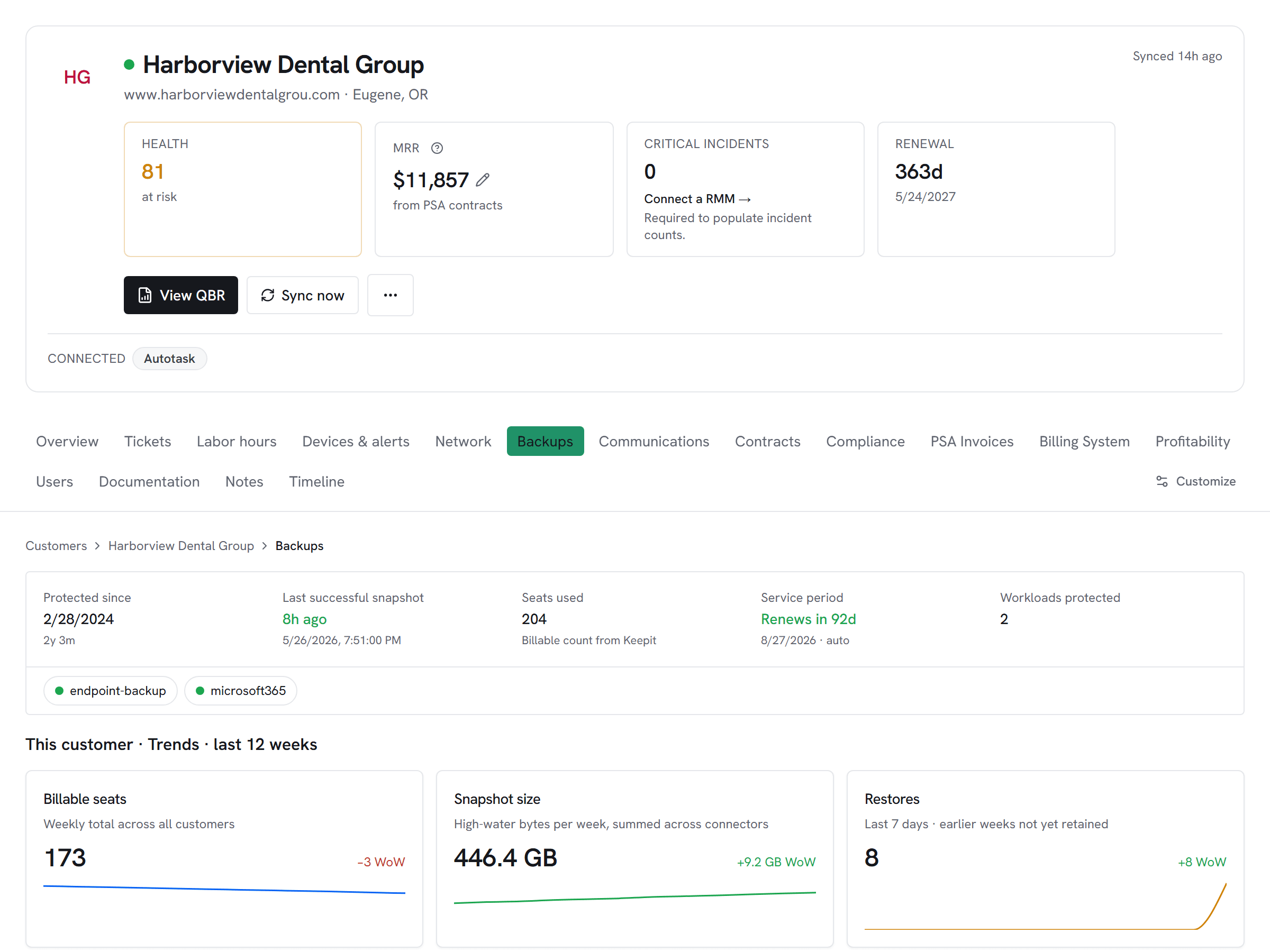
Vectis customer hub backups tab for a Keepit-connected customer — Microsoft 365 SaaS-backup snapshot size growth, billable seats, restores, and last-successful-snapshot timestamp alongside endpoint-backup status.

What Vectis syncs

The read side of the adapter.

Vectis enumerates every Keepit account visible to the API token, then pulls the connectors per account — Microsoft 365, Entra, Google Workspace, Salesforce, Okta, and the rest of the supported set. Latest backup status and timestamp sync per connector so the customer hub shows freshness at a glance. The Keepit audit log (user, account, connector, connection, recovery, reporting, security, and compliance events) drains onto the customer timeline alongside PSA and RMM events.

What you can do

The write side of the adapter.

Keepit is a read-only adapter here — Vectis surfaces backup health and audit events, but the actual backup-job and recovery lifecycle stays inside Keepit. The value lands in correlation: a stale connector (no successful backup inside your freshness window, default 48h) trips the backup-stale alert, which can open a PSA ticket or post to a Slack channel via the rules engine. Keepit audit events sitting inside an open ticket's window for the same customer attach to that ticket, so the dispatcher sees the full sequence.

Honest about the limits

What we don’t do, and why.

Keepit's API is read-only for backup state — the actual restore and recovery lifecycle runs through the Keepit console, not Vectis. Per-account token scoping matters: if you want Vectis to sync only one Keepit account, pass the sub-account GUID in the integration config; otherwise the adapter syncs every account the token can see. The audit log drains on a 14-day rolling window per sync to keep volume bounded on chatty tenants.

How it correlates

One customer, every tool.

Keepit on the customer account hub alongside every other system you run — not a standalone dashboard. A few of the most common shapes this takes:

Stale backup → alert before the customer notices

A connector hasn't reported a successful backup inside the freshness window (default 48h). The alerts engine fires the backup-stale trigger; the rule of your choice opens a PSA ticket or pings a Slack channel.


Keepit audit events on the customer timeline

Recovery, security, and compliance events from the Keepit audit log land on the same customer timeline as PSA tickets and RMM alerts. When an event falls inside an open ticket's window for that customer, it attaches to the ticket so the dispatcher sees the full sequence.

Setup snapshot

What connecting looks like.

In Keepit, open Users → Edit User → Security → Add API token to mint a dedicated API user and token for Vectis. Grab the regional subdomain from your Keepit URL (e.g. eu, us, ap) and paste the token, region, and optional sub-account GUID into Vectis; the sub-account GUID restricts sync to a single Keepit account, while a blank value syncs every account the token can see. Vectis tests the connection by calling /users before saving so a bad token fails fast. The first sync pulls connectors and latest status; the audit log drains on a 14-day rolling window.

# In the Vectis hub, add the connector:
category  Backup
vendor    Keepit
status    Read-only

Read the full setup guide

Other Backup integrations

Evaluating Keepit against the alternatives?

Pricing

Keepit is available on every Vectis tier — $299/mo and up. See pricing

Also reachable over MCP — bring your own client → /mcp

Try Vectis with Keepit.

30-day free trial. Connect Keepit at signup. See every customer with their full context on day one. Month-to-month, cancel anytime.
Vectis + Keepit Integration | Unified Workspace for MSPs | Vectis